Building an AI Knowledge Compiler with Google's Open Knowledge Format and Qwen Code CLI
When Google introduced the Open Knowledge Format (OKF), most discussions focused on the specification itself.
How should metadata be written?
What does an OKF bundle look like?
How should documents be organized?
Those are interesting questions, but they weren't the questions I had. My question was very much simple.
Can I actually use OKF today to make my local AI assistant significantly better?
Over the last few days I built a complete OKF pipeline around Qwen Code CLI, Ollama, and my own collection of enterprise documents. The result surprised me. Instead of inventing another RAG system, I ended up building what I now call an AI Knowledge Compiler.
This article explains why I built it, how it works, and why it has become part of my daily workflow.
My work as an Enterprise Architect involves reading hundreds of technical documents every month. Some are PowerPoint presentations, some are architecture specifications, standards, contracts or technical/business requirement documents. Everything stays on my local workstation because many of these documents cannot be uploaded to cloud services.
I already use Qwen Code CLI with a lot of SKILLS together with Ollama, so the obvious question became:
How can I organize all of this knowledge so my local AI assistant can actually navigate it?
That is where OKF entered the picture.
One thing I noticed quickly is that asking an LLM to search hundreds of PDFs or PPTX is not the same as giving it a structured knowledge base. The model spends too much effort discovering where information lives. So, I wanted to invert that process. Instead of asking the AI to organize my documents every time I ask a question, I wanted to organize them once.
That's exactly what OKF enables.
At first glance, it looked like another documentation format. After reading the specification more carefully, I realized something important. OKF isn't trying to replace documentation. It's trying to organize knowledge in such a way that AI agents can understand.
That immediately gave me an idea. Instead of building another search engine, I could build a knowledge compiler.
What Is an AI Knowledge Compiler?
We compile source code into executable programs. Why not compile documents into AI-friendly knowledge? That simple idea became the foundation of my project.
Instead of this: PDF/PPTX -> LLMI wanted this:
Enterprise Documents -> Knowledge Compiler -> OKF Knowledge Repository -> Qwen Code CLI -> LLMSuch a way, the AI no longer needs to figure out where information lives. It already has a structured knowledge repository.
My Pipeline
The complete pipeline looks like this.
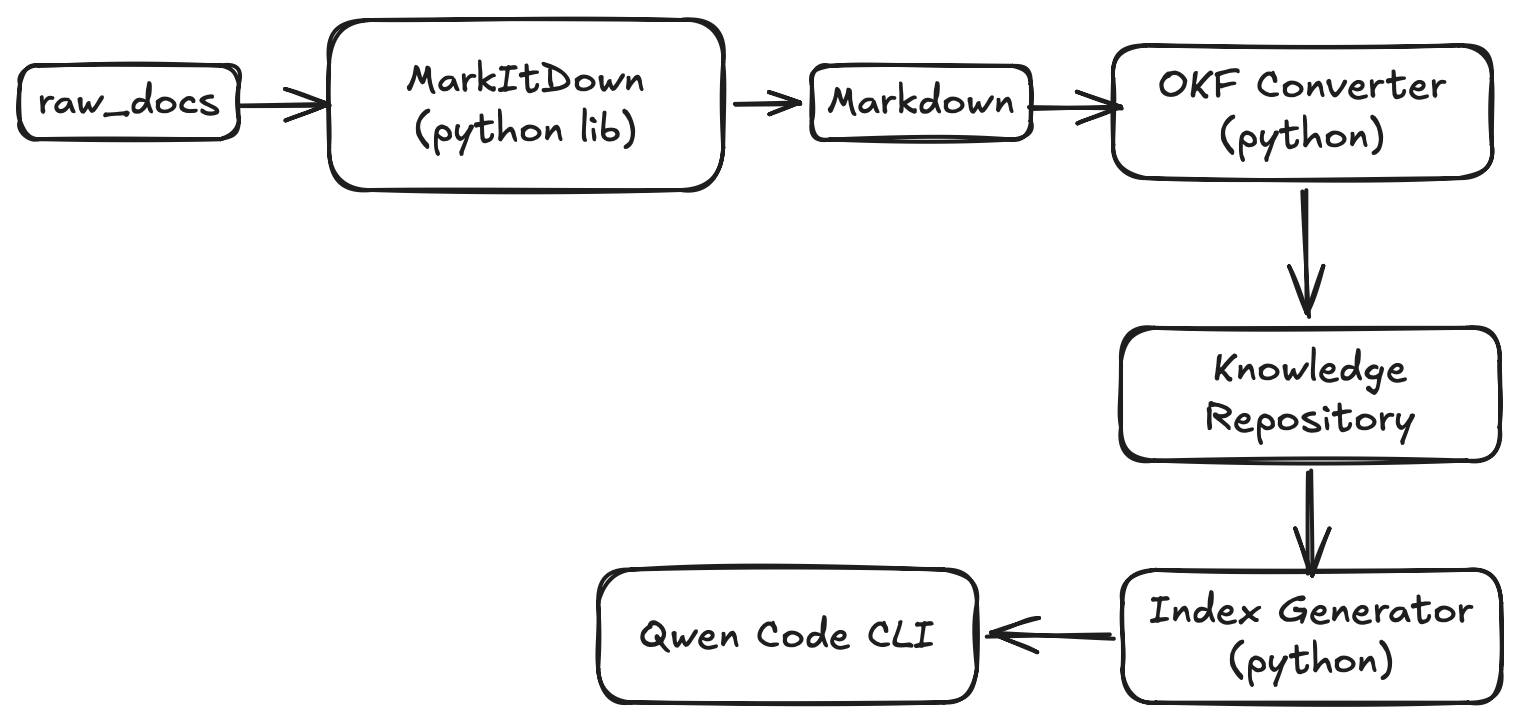
Each step has only one responsibility. Let's look at them one by one.
Step 1 — Store Original Documents
I keep every original document exactly as it was received.
raw_docs/

    Platform Board/

    Standards/

    Contracts/

    Architecture/

    Research/
These files remain my source of truth. The compiler never modifies them.
Step 2 — Convert Everything to Markdown
The next step uses Microsoft's excellent MarkItDown library.
It converts
PDF
DOCX
PPTX
into Markdown. This immediately makes the documents much easier for LLMs to process.
Step 3 — Convert Markdown into OKF
Every generated document receives OKF metadata. For example,
---
type: documentation_concept
title: Replication Strategy
description: Explains asynchronous replication between data centers.
resource: local://raw_docs/Platform Board/Architecture.pdf
tags:
  - pdf
  - architecture
---
Now every piece of knowledge describes itself. Instead of anonymous Markdown files, I have structured knowledge objects.
Here is the source code of the okf_converter.py
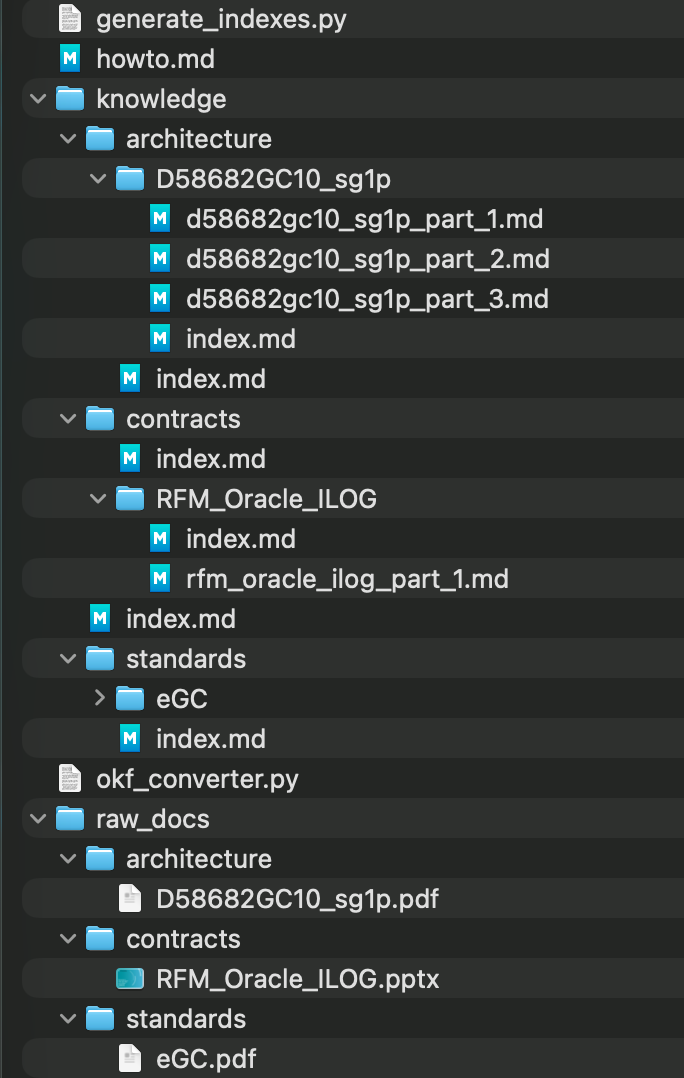
Step 4 — Preserve the Original Folder Structure
This turned out to be surprisingly important. Suppose the original file is
raw_docs/

    Platform Board/

        Architecture.pdf
The generated repository becomes
knowledge/

    Platform Board/

        Architecture/

            replication.md

            monitoring.md

            backup.md
The structure remains familiar. I don't need to invent another organizational system.
Step 5 — Generate Automatic Indexes
The final step creates an index.md file for every directory. These index files act as catalogs.
Instead of asking the AI to search hundreds of Markdown files, I first give it a map of the repository. Here is an example of the index.md file
---
type: index
title: Root Knowledge Index
description: Navigation index for Root Knowledge concepts.
---

# Root Knowledge Index

## Subdirectories

* **[Architecture Index](architecture/index.md)** - Navigation index for architecture concepts.
* **[Contracts Index](contracts/index.md)** - Navigation index for contracts concepts.
* **[Standards Index](standards/index.md)** - Navigation index for standards concepts.
Here is the link of the source code generate_indexes.py
The structure of the workspace after generating all the metadata.
Working with Qwen Code CLI
This is where everything comes together. Instead of asking
Search every document for reliability requirements.
Now I ask
Using @knowledge/index.md as your catalog map, find the specific slide section talking about "Logical replication using CDC"Qwen first reads the catalog. Then it navigates through the generated OKF repository. Only then does it open the relevant document.
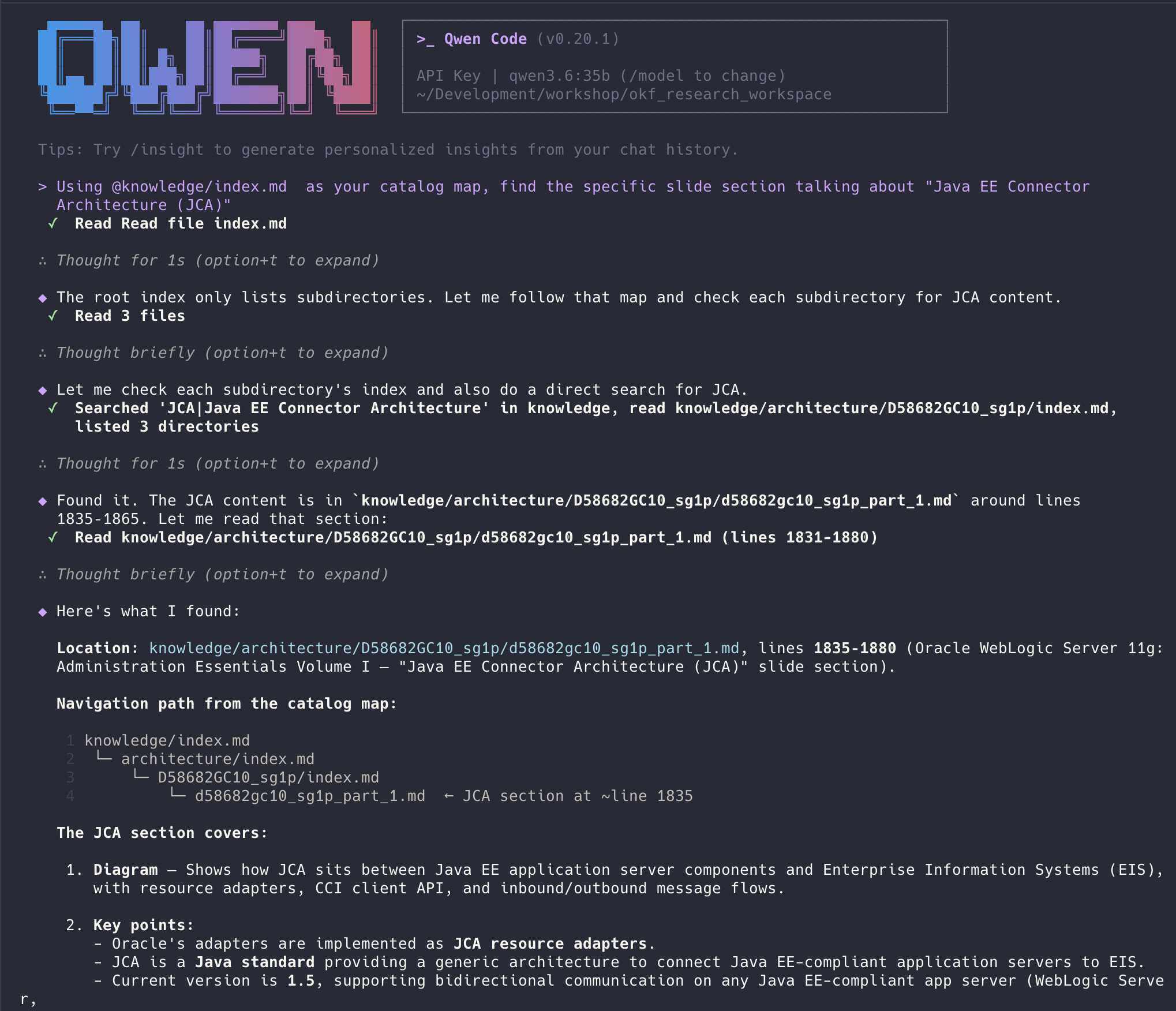
This feels much more like browsing a well-organized library than searching a folder full of PDFs.
Why the Index Matters
One of the biggest improvements wasn't the metadata. It was the generated indexes. Instead of presenting hundreds of files to the model, I present a navigation tree. The AI spends less effort discovering where information lives. It spends more effort understanding the information itself. That simple change noticeably improved my workflow.
Why I Like This Approach
Several things surprised me. The repository is completely transparent.
Everything is Markdown.
Everything is stored in source control.
Nothing is hidden inside a vector database.
If I want to inspect a generated knowledge object, I simply open the file. If I want to improve the catalog, I edit the converter and regenerate everything. The pipeline is deterministic and reproducible.
Is This Replacing RAG?
Absolutely not. I don't think it should. RAG and OKF solve different problems.
If you're building a customer-facing chatbot over millions of documents, RAG is still an excellent solution.
My use case is different. I'm building a personal knowledge environment for an Enterprise Architect. I want my local AI assistant to work with my documents the same way I do.
For that workflow, a structured OKF repository feels much more natural.
What's Next
The current implementation is only the first version. There are many improvements I'd like to add:
richer document classification
automatic tag generation
concept extraction
cross-document relationships
better metadata
incremental compilation
knowledge graph generation
semantic links between concepts
At the moment, every knowledge object still represents part of a document. Eventually, I'd like the repository to evolve into a true knowledge graph where concepts are connected across many documents.